IOS 6 app store crash on your iPod touch 4? Restore.

For weeks the app store has crashed constantly on my iPod Touch 4th gen after the over-the-air IOS 6 update. Restoring the iTouch to a fresh install of 6.0 on iTunes fixed the problem and now the app store works better, not perfect, but better.

Symptoms: I would search for something, and swiping left or right on the cards would crash – sometimes I would be able to see some cards if I let the app sit for a half minute and pre-fetch everything, but when I got to item 24 or so I’d be gauranteed a crash again. I’d have similar problems browsing categories of apps and trying to install them. Sometimes I’d tap the “Free” or “$1.99” button for an app, and the button label would switch to the size for “install”, but actually be blank… at that point tapping on the button did nothing. Every time I tapped “updates”, then “purchased” to install something my wife had recently put on her iPod – crash.

Attempted Fixes: I run a lean machine, I dont do iCloud, I minimize the number of notification center apps (basically facebook, and mail, that’s about it), and I tried to alleviate the crashes by closing all background apps. No dice. I also tried restarting the device several times, which still did not fix the app store on my device – it was simply messed up.

Device History: This device was a 4.x IOS stock install, updated to 4.2 and/or 4.3 later via computer tethering. Later it was updated to 5.0 via computer, and then to 5.1.1 over-the-air. Finally it was updated to 6.0 over-the-air. I never once restored the iPod to a “fresh” install for any of those versions IOS, and I suspect there was some minor update bug that rears its head when you’ve been through a number of update cycles from version to version in the past without a clean/fresh install.

How to Restore: Restoring your iTouch is easy, you hook it up to your computer, let iTunes backup your apps and app state. You then tap the “restore” button. iTunes will then install a fresh copy of IOS (without retreading upgrade cycle ground), reboot your device, and then put your apps/music/etc and app settings back exactly the way they were before. Before I restored, I backed up my photos, notes, and other things I’d miss if something went wrong, just in case. I’d recommend that you do the same.

What works better: After restoring, I am able to easily navigate hundreds of search result cards deep, and install multiple apps from the categorie top X lists without a crash, but I’m still unable to view previous purchases without a immediate crash. I’ve purchased hundreds of apps over the past few years, so that could have something to do with it. I also still see the button labels being broken after tapping the “Free” price button on apps I’ve never installed before, but now tapping that button a few times after a few seconds eventually flips to “installing” and all is well. I’ve succesfully had the app store running while installing 3 apps, still browsing, an no problem at all – it seems much smoother, but I’m just happy it doesn’t insta-crash when I try to do almost anything anymore.

There are some threads floating around on the issue, and numerous bugs opened on apple’s bug reporting site. I’ve seen some discussions where some users try restore and claim it’s not working well for them, your mileage may vary.

Regularly losing hard drives? Try clean power.

A few years back, I was losing 1 to 2 hard drives a year, every year. I was purchasing quality drives (for consumer grade..), and it did not seem to matter if a drive was internal or external, the life span was just junk.

Your computer’s parts are highly sensitive pieces of equipment in terms of power. They operate correctly in a narrow range of voltage levels and wattage. Giving your hard drives or motherboard a bit too much juice or just a tad too little, and your hardware could become damaged.

There are three basic problems with power that you could encounter. I’ll bet you’ve only heard of these two:

  1. A surge or spike in power – this is when something goes wrong up the line from your house, such as a lightning strike nearby, and far too much power comes down the line to your house. This is protected for by a surge suppressor.
  2. A brownout or blackout – this is when power cuts off or dips enough below regular levels that your computer shuts off, potentially losing data while you were in the middle of something. We protect against this with a battery backup system (aka: ups system).

The third problem that you can encounter with power is voltage regulation issues. That is, when your voltage level at your socket isn’t quite what it should be during certain times. You can occasionally see a dip or spike in voltage levels around your house if you see your lights dim slightly or become brighter for a moment every time some large appliance (or, in our case, our A/C system) puts a huge burden on the power system as it powers up.

In my house, when my A/C kicks on, the voltage to my sockets drop or rise from 120v to something a few volts lower or higher, many times per day in the summer. Over time these “dirty power” fluctuations take their toll on your computer and other electronic equipment in your house, and in some cases ruin your equipment. The dirty power in my house and my apartments previous to the house were regularly eating my hard drives.

For voltage regulation issues, you need a voltage regulator. A voltage regulator is a device that maintains a constant voltage rate, in other words: clean power. It instantly dumps off excess power or boosts the power enough to maintain a constant clean power source that you otherwise would not have.

Most battery backup systems also have surge suppression built in, and some high end battery backup systems also have voltage regulators built in, but not all. Further, some high end power supplies for your computer may have some amount of voltage dip/spike tolerance built right in, but most do not, and you’re almost guaranteed that the $5 wall-wart power supply for your $50 external hard drive enclosure has no such protection built in at all.

The voltage regulator I bought was about $50. I bought this model: the APC LE1200. The voltage regulator has a plug for the wall, and 4 sockets on the back of the unit. It also has three LED indicators on the front of the unit that indicate dirty and clean power situations: high, low, and just right. The unit makes a satisfying (but not too loud) “click” sound when it jumps into compensation mode for high or low input. I can always tell my A/C is about to come on in a few seconds when I hear that click.

I haven’t lost a hard drive since I purchased my voltage regulator almost 4 years ago.

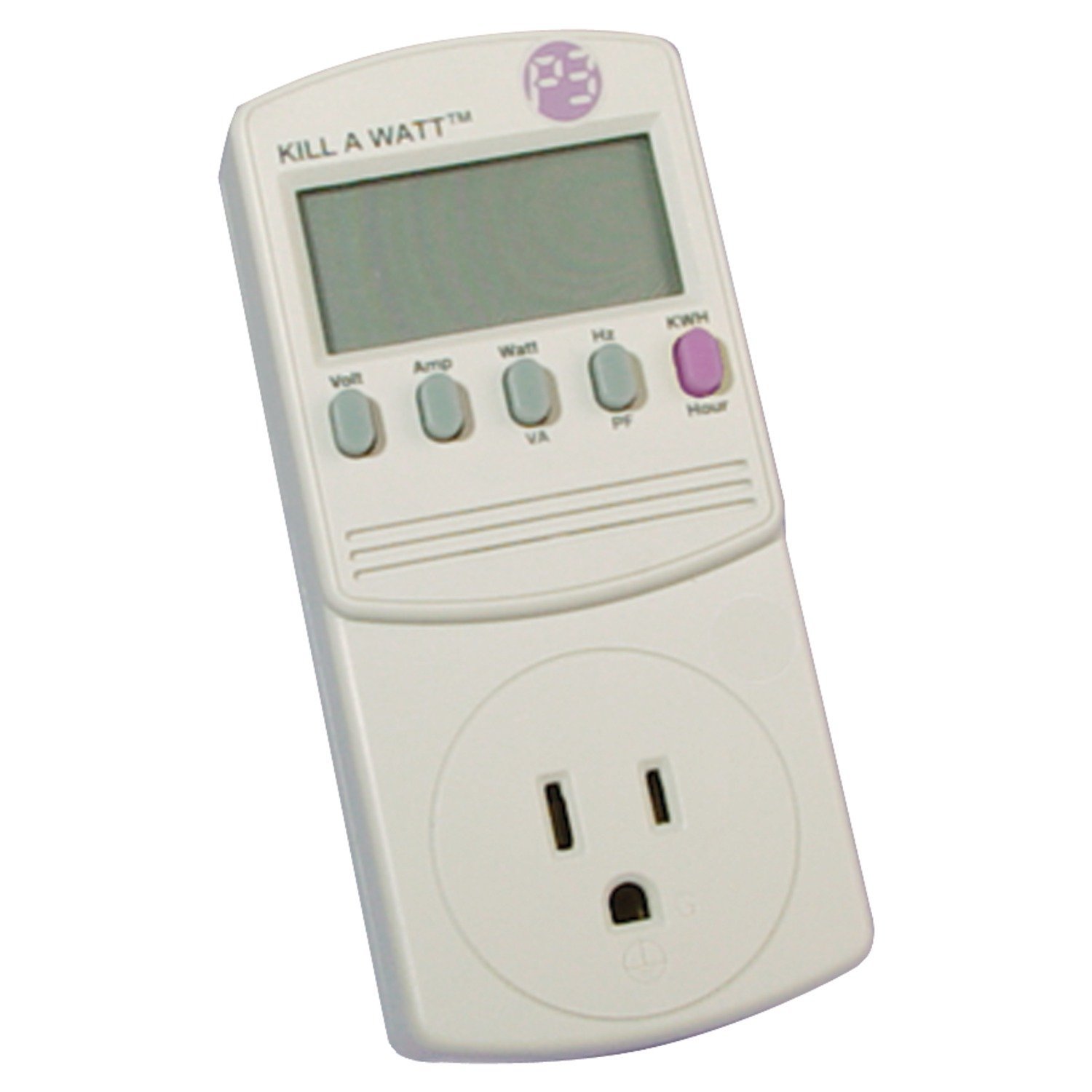
If you don’t have $50 to burn on a theory for your outlets feeding your computer, entertainment center, and so on, I would highly recommend buying a kill-a-watt for $20 and checking out your voltage levels around the house or apartment from time to time.

A kill-a-watt is an amazing device for learning about power consumption and dirty power. In voltage mode, you’ll be able to see your voltage drop from 120 to 118 when a dirty power event hits, and in the far more useful wattage modes you’ll be able to see precisely how many watts are drawn by your entertainment center in an instant. The kill-a-watt also features a KWH counter which is very useful to see usage over time, you simply leave the kill-a-watt between your outlet and your plug, and check it a few days later to see how many KWH of power your devices have eaten.

Finally on GitHub, you should be too.

I’ve finally started migrating/publishing code on GitHub. Coder cowboy git code will be here: https://github.com/codercowboy

For starters, I’m migrating old World’s Worst Software code there, so I can retire WWS.

I highly recommend publishing your own open source code and projects on GitHub or SourceForge, or on a blog or website of your own.

You don’t need to be a coder to put something great out there (or even on GitHub), sharing your creative efforts with the world is almost always a good idea. Designers can share photoshop templates, writers can store and show their book writing/editing process, source control and sharing your efforts is truly for anyone.

When you share your efforts, you are doing the following: you’re saving other people time; you’re inspiring other people to share their own work; you’re building a portfolio of good deeds to cite on your resume; and you’re making the world a better place.

Git is a source control management (SCM) system, like Subversion (svn), ClearCase, Mercurial, Source Safe, and a dozen other such systems.

A source control system is a system that lets you store old and new versions of a file, and easily retrieve old versions of that file later. It’s basically a backup system, but it does so much more than backup. For example, source control systems can make it very easy for people to collaborate on a project, editing and changing files for a project together, from separate computers.

GitHub provides git repository hosting. They provide free hosting for open-source/publicly-accessible projects, and have reasonable paid hosting plans for private projects.

Git can take a little time to get used to, fortunately the official git website has some great tutorials to get you started. GitHub also has tutorials, as well. Though, I would say the easiest way to learn Git is from a friend or colleague. I’d highly recommend David Pratt’s quick tutorial, maybe someday I can con him into publishing something online.

If, like me, you’d rather just get-work-done and don’t care for command line source control tools unless absolutely necessary, I’d highly recommend downloading SourceTree, which is a free high-quality GUI Git client.

If you’re a Subversion die-hard, SourceForge is basically GitHub for svn, so you can share there instead if you prefer. Alternatively, many web hosts such as dreamhost (the host I use) now provide Subversion and/or Git hosting solutions.

I’d recommend Git over Subversion for a few reasons:

  • Sourcetree is an amazing tool, on par with many of the paid clients for Subversion for non-windows users. (If you’re on windows, tortoisesvn is a pretty amazing free tool as well.)
  • Git works offline, as the entire repository is cached on your local box. So you can commit piecemeal parts on your box, then “push” a bunch of commits home when you’re back online. Another major advantage of this offline feature is that you can almost-instantly revert changes or look at older changes without remote-server latency problems.
  • Git merges better in many situations.
  • Git allows you to work locally and micro-commit just like you would with Subversion, but you don’t actually have to push all of your work remote to work in git in small increments. If you want, you can even “squash” several commits into one.
  • Git stores all repository information in a simple “.git” file at the top of your repository tree, so manually cleaning repository junk is as simple as deleting that one directory if you need to, which is even easier than a svn export.

There are other reasons users smarter than I would recommend Git, and there can be some confusing aspects to working in Git that will be foreign to someone familiar with svn, but the change will be worth it after only a little while.

A really great time to consider switching to Git is the next time you hit some merge hell with subversion where you *thought* subversion would just figure it out, but doesn’t. In many of those cases, Git does what subversion will not.

I’d recommend publishing your open source code to GitHub if you don’t already have a better place to store it. For me, pushing to github is something I’ve been meaning to do for a long while. It’s just easier to push to GitHub than manually zip and prep code pages here on my wordpress installation on coder cowboy.

A quick word about my inspiration to finally make the leap, today I saw a thread on KLOV about Seattle arcades, and someone posted a link to this amazing site: Pinball Map. Pinball Map’s home page mentions that the site is open source on Scott Wainstock’s GitHub page, which means maybe I or someone else can make an arcade maps page fairly easily in the future, all thanks to Scott. Also, you absolutely must check out Scott’s amazing iHodor app.