
I was 12 years old when NBA Jam was released in arcade form. I remember the first time I saw the game at showbiz pizza. It had unbelievable graphics beyond anything else at the time, and amazing forever memorable gameplay. Who can forget the first time they saw someone “On Fire”, or heard the snarky announcer’s “Boom-shaka-laka!”? I played the game rabidly when I could. Even when I lost, I wanted to jump right back in and play again. The game was an arcade sensation that was the first to have more than a billion dollars in quarters pumped into it.
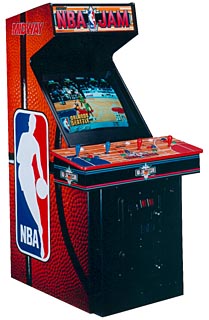
The arcade version in action.
NBA Jam came out during the last few years of arcade bliss. Consoles were quickly catching up to and eclipsing the Arcade experience. NBA Jam, Mortal Kombat, Street Fighter 2, these were the closing chapters to a golden era of the arcade version of a game being far superior to the eventual port.
At the age of 12, I wanted that NBA JAM machine at home. I distinctly remember asking a local arcade’s employee how much such a machine costed. The employee looked at me like I was crazy, then dropped the bomb: $3500 on the low end, $5-$6K was the norm. I decided that I could settle for the home version of the game and put the thought of owning such a machine out of my mind for good.
The following year I played my game gear versions of NBA Jam, and NBA Jam TE every day after school for hours at a time. Years later my brothers and I would drain hundreds more hours into 4 player NBA Hangtime (a later sequel in the series) games on the Nintendo 64. To say that NBA Jam has a special place in my heart and memories would be an understatement, but I also never forgot that the machines cost $3K, so I let my 12-year-old dream fade and settled with crappy console ports and revisions that never quite lived up to the real deal.
The game gear version, not quite the same, but the SNES/Genesis versions weren’t much better.
Now, 20 years later, I own a NBA JAM arcade machine, and the machine did not cost $3000+. The machine (actually a NHL Open Ice cabinet) costed $300, and the NBA JAM game was a mere $30.
When you search around on Ebay or Craigslist, you will easily find arcade listings that confirm the $3000 price tag, and you’ll find suckers who pay as much just as easily. The truth of the matter is, as the arcade business winds down, the value of a machine is going down with it.
The trick to finding a reasonably priced cabinet is that you have to know where to look, and what to look for, and be patient.
Know the basics of the arcade business
Back in the day, when 1MB of on-board ROM was $1000, a NBA Jam cabinet with a fancy high quality 25″ monitor, and 300 pounds of 3/4″ plywood did indeed cost $3500 or more.
Arcade owners would buy arcade cabinets, and as games got old, the owner would simply switch an easily-pluggable game board out, put a new sign on the top of the arcade, and call it a new game. For example NBA JAM, NBA JAM T.E., the NFL Blitz series, and NHL Open Ice all use the exact same cabinet design.
It was not uncommon for an arcade owner to buy Mortal Kombat 1, then later paint over the cabinet artwork in black paint, stick the Mortal Kombat 2 marquee in the top of the arcade, put the MK2 board in, and call it a MK2 machine. This doesn’t mean Midway did not sell original Mortal Kombat 2 cabinets, they did, often times it was more cost efficient to simply buy an upgrade kit instead.

Today when you’re buying an arcade, the upgrade kit route benefits you. You can look for a completely original cabinet (called a dedicated cabinet) with the original game. Or you can piece together a gutted cabinet for $100, with a monitor for $150 and joysticks/buttons for another $100, and then just buy the board for the game you want.
In my case, I had no interest in restoring or otherwise fighting against technical issues with a half-working cabinet, so I searched for an NBA Jam compatible machine in good shape, and just stuck my NBA Jam board inside and called it a day.
Know where to look to research
Your research will start, continue, and end, at the Killer List Of Video Games website and forums. KLOV is the #1 arcade collecting community on the web. KLOV has an excellent index of arcade games, a great database of members looking for and selling machines, and a super friendly and intelligent community of people pouring everything you’ll ever need to know into the KLOV Forums.
Start by looking at the index page for your favorite arcade game, such as this one for NBA Jam.
Pay special attention to the parts of the page mentioning how common the game is, and the links to the KLOV member database listing KLOVers who own or want to own or want to sell their arcade. If you see dozens of owners, and the game’s pretty common, you can usually expect to pay less than $1000 for a good quality machine. There are exceptions of course, such as a fully restored top quality game from 1982, but common mid-90s stuff is fairly prolific and easy to come by, and thus: cheaper.
After reading up on your arcade’s index page, join the KLOV forums as a member, so you can search forum topics for your game. There you will find discussions of common issues with the game, and information such as what game cabinets work well for the game if you can’t find a dedicated (original) cabinet.
Know what to look for and what can go wrong
General Important Info:
- Wikipedia’s great Arcade Cabinet page has some great starter info.
- An arcade cabinet weighs 300+ pounds. That’s a 80-100LB monitor, and a whole lot of 3/4″ particle board to make sure the machine isn’t going anywhere. If you plan to fetch one, bring 3 strong friends along.
- The back of the cabinet has a locked door on it, if you purchase an arcade you will need to have the keys to get into this door to get to the monitor’s adjustment controls, the game boards, etc.

- The front of the cabinet has a coin door. Inside that door, there’s a collection of important diagnostic buttons and buttons to add free credits. The key for a machine (both coin door and back door) may be hanging on a screw peg in that coin door. You need that key or a good screwdriver and some muscle to be able to unlock the coin door.
- The machines I’ve encountered have this 4-button panel inside the coin door. One of the buttons simulates coins dropping in (for free credits). Another puts the game into a diagnostic/setup mode where you can change game settings, calibrate light guns, adjust sound volume, set games to free play, and more.

- Cabinet dimension information is available on the web, many are about 6’1″ tall, just tall enough to barely not stand up in a 10′ U-Haul truck.. so go for the 14′ 🙂
- Generally speaking, a standard arcade cabinet can fit through a doorway, unless of course it has a really wide control panel on the front for 4 players, like NBA Jam, or Ninja Turtles. No worry in this case though, the control panel pops right off, assuming you can get into the back of the machine through the door to release control panel latches and screws.
- When you go to pick up an arcade, bring along the following items: flashlight, notebook, pen, and a screw driver set with adjustable tips with crazy ends like hex tips (it’s mostly flathead/phillips, but you never know..). Don’t forget the transportation essentials: a pickup truck or u-haul 14′ rental, blankets for padding, ropes and tie downs, and an appliance dolly.
- Don’t buy an arcade without inspecting it first. Turn the game on, try all the buttons, see how the monitor looks, adjust it a bit if necessary, make sure the game plays for a number of minutes, and so on.
About Game Boards:
- A *LOT* of arcade games are basically little motherboards with a processor, and various ROM/RAM/sound/etc chips. These are called PCBs. Many arcade collectors own one or two arcade cabinets, and several PCBs. For example I have an NHL Open ICE 2 on 2 cabinet, and PCBs for NBA Jam, NFL Blitz ’99, and Police Trainer. All four games work great in my cabinet.

NFL Blitz (w/ HD) on left, Police Trainer on right. - Later 90s games, such as War Final Assault, Police Trainer 2, and others are more like full on computers, with a full computer mother board, video card, hard drive, and so on. Some, like NFL Blitz and Killer Instinct are simply a PCB + a hard drive.

WAR has a PCB, a sound PCB, hard drive, and video card. - Likewise, early 80s games and earlier may have a interesting assortment of circuit boards and wiring mess that you won’t see in the mid-90s era.
- There’s a great standard connection called JAMMA that most games connect to. The JAMMA connector is basically a long strip with a standard pin configuration. Plugging the JAMMA connector to a game board is simple, and the simple act of plugging that in gives you the following: power, video, sound, controls. It’s as easy as plugging a nintendo cartridge into a NES… most of the time..

- Like those old NES games or any computer motherboard, the games typically have a little watch battery on the PCB. This battery keeps saved data alive, and is a simple $5 fix if you find your game settings or high scores are not saving between power cycles.
- Older games like Pac-Man, Defender, etc, may be pre-JAMMA, and require a great deal more research to understand how the wiring works.
- Some games have a bit more than the JAMMA standard provides, for example JAMMA provides for 2 players and 3 buttons each. A game like Street Fighter 2 with 6 buttons per player will have another little place on the board to wire in a connector for each player’s extra buttons. My 4 player NBA Jam cabinet has player 3 and player 4 controls on a little wire harness that simply “just works” on all of my midway NBA Jam variant games (NFL Blitz/NHL Open Ice). Hooking that midway player 3 or player 4 harness up to a non midway 4 player game like The Simpsons or X-MEN may not be as easy.
- Some game boards are notoriously finicky or will give you hell in various ways, especially early 80s and before type games. Tempest is one you’ll hear about often. Mortal Kombat 2’s sound board goes bad pretty quickly and often. Some capcom games had a per-machine encryption key stored in battery-powered memory, 5 years later when the CMOS battery (nicknamed the “suicide battery” on these boards) ran out of juice, the board was useless. Good stuff, and, fortunately, not the norm. In most instances, a PCB will work great for years to come.
- Sometimes a board’s capacitors or chips go bad. People on KLOV know how to fix these issues. Heard of MAME and arcade ROMS? Those zip files for the roms contain digital images from physical ROM chips or Hard Drives from the actual arcade machine. If such a chip or HD goes bad, KLOVers have equipment to make a new ROM chip to sauder in, and some KLOVers even sell compact flash replacements with IDE adapters for certain games with aging hard drives.
- Some games have more than one board. When a game has a seperate board, there’s inevitably a custom way to wire between the main board and that board. For example my NBA Jam sound board requires a rediculous harness that goes from one port on the main PCB to parts of 3 ports on the sound board. If you’re the enterprising type, you can make your own wire harnesses within reason. My buddy and I were able to decipher a schematic from the manual and figure it out (shown below). On the other hand, KLOVers, various online collectors (such as Bob Roberts), and retailers sell common replacement wire harnesses for popular games.

- There are game manuals available, these manuals often sell on ebay for $10-$15 a piece, but KLOV members mention several online websites with scans of manuals. These manuals can be critical for things like understanding how to wire one game’s control wires to another game’s board, or knowing which switch out of a bank of 12 switches makes the game be in Standard video resolution rather than Medium resolution.
About Monitors (and how they can kill you, no joke):
- There are a number of differing monitor types, but the two you will hear about most often are standard resolution and medium resolution. Many arcade games from the mid-90s and before are standard res or lower, some around that period are medium res. Often times medium resolution games have jumper switches on the PCB that’ll make them work with standard res if that’s what you have.. you don’t get the same luxury going the other direction, so if you want several games, consider sticking to standard res in the cabinet you find.
- Some games use a horizontally mounted monitor, and others (especially older games) use a vertical mount. (thanks cdjump!)
- The monitor is open-backed inside the cabinet and can hold a 25,000 volt charge that can kill you if you touch it wrong, even when powered off. Be aware of this, and be very careful to leave the monitor alone unless you know what you’re doing. The topic to search for is “anode discharge”, and this CRT Safety PDF mentions the problem in passing. Be aware that many KLOVers insist on doing the anode discharge several times in a row before messing with the monitor, and doing the discharge again before plugging the machine back in.
- Monitors can go bad over time, often times needing either a capacitor replacement (called a ‘cap kit‘), or something called a flyback repair. If you’re looking at a machine with a crappy monitor, a new one can cost $150-$200 without shipping, they’re on KLOV for-sale forums all the time. Alternatively a local TV or arcade repair man may be able to do the cap-kit or flyback fix. I highly recommend having a professional do any monitor work, because, again, there are stored voltages that could kill you when screwing with the monitor.
- Monitors are not the same as your 25″ $100 sharp CRT from a few years ago, there’s a reason the machines costed $5K when they were new, and a high quality monitor with differing hookups than your antenna TV from back in the day is part of that reason.
- Most monitors have focus/brightness/contrast adjustment control panels connected to them, you can find this by getting into the arcade through the back door.
- Arcade Monitor Repair and Arcade Repair Tips are great resources for learning about common problems with monitors.
About Controls:
- Joysticks and arcade buttons are cheap. Like, $3 for a brand new arcade button cheap. You can find them online with aid from KLOV info. One way to find retailers is to search for “Happ” (a manufacturer of some common arcade control parts). Some popular choices are Groovy Game Gear, or Ultimarc
- Not all machines are the same, and some quite old or rare machines have parts that are not easy to find. This includes controls parts. If your machine is 8-way joysticks and buttons and that’s it, you’re in pretty good shape. If it’s monkey ball with a custom joystick in the shape of a banana.. finding a replacement joystick may be a bit of an exercise.
- If you’d like to have one cabinet and many arcade boards, consider getting something that has 2 joysticks and 6 buttons per player, like a street fighter cabinet. Most arcade games are 2 player or less, and use anywhere from 0 (bubbles) to 1 (joust) to 2 (many games) to 3 (nba jam and variants) to 5/6 buttons (mid-90s fighter games).
- If you’re looking at light gun games, know that in general light guns have 4 wires, and depending on the arcade machine these wires may be configured in different orders than the arcade board expects, a simple trip to radio shack and a quick look at schematics will help resolve this. There’s a “Happ” wiring standard that’s fairly common, for example my Police Trainer uses this.. unfortunately my guns are non-HAPP, so another bit of wiring magic was required there..

Know what works for you
There are options. You can buy one arcade cabinet and switch out the game boards inside. You can purchase a $3500 MAME machine from an online retailer, or you can collect several cabinets for each game you’re interested in. Further, if you’re really handy, you can restore or convert a junked out cabinet into something much better, like this guy, or this guy. Arcade Cab is a great resource for do-it-yourself cabinet building.
Know how to search & what to pay
Finding arcades can be tricky if you don’t know the right tools to use. Here are some suggestions
First, I would recommend subscribing to these two RSS feeds from KLOV in your Google Reader:
Next, I would recommend setting up an Ebay saved search in the arcade/jukeboxes section with keywords for games you’re interested in.
Lastly, Craigslist has a pretty neat feature where you turn a search into a short-lived RSS feed, but their force-you-into-one-city-per-search UI from hell can be cumbersome. For example, I live in Austin and at one time I had to go setup the same 3 RSS feeds for 7 different craiglist subdomains: austin, waco, san antonio, houston, college station, dallas, fort worth.
It’s much easier to just setup some Google Alerts, which email you when new items show up in Google’s search index. Each alert’s settings should look like this:

And a little google kung-fu will go a long way.. instead of “NBA Jam Arcade”, try “NBA Jam Arcade site:craigslist.org” or “NBA Jam Arcade site:ebay.com”. I’d recommend setting up such alerts for both Ebay and Craiglist, as Google’s better than either site at finding content in their listings.
With your searches in place, be prepared to wait. You need to wait so you can see how often your game or games become available. You need to wait so you can see how people price the game and how the price falls very quickly when they’re moving and don’t want to deal with the arcade.
Know that something in really great condition, like a restored Robotron cabinet in great condition from 1982 can be pricey ($2K or so). Similarly something relatively new like Mario Kart GP may still command a $6K price tag b/c it will still make money in an arcade. For common stuff though (NBA Jam, Street Fighter, Contra, etc), if it’s more than $1000 per cabinet, even in great shape, you’re probably getting ripped off. You’ll see numerous humorous threads on KLOV for sale pointing to ebay and craigslist listings with these rip-off prices.
Once you know the price range for your game, try to find it local. It can cost several hundred dollars to ship an arcade freight across the country, or u-haul it back home from somewhere hours away. Consider looking up the game on the KLOV index again and seeing if the DB has any KLOVers in your area looking to sell.
One last tidbit on buying: Auctions and liquidations are fairly common. Do some research on KLOV though about some of these auctions. Some recur fairly often, and some are run by some dicey liquidation companies where KLOVers have noticed the same shill bidders from the company itself artificially driving prices up.
Know when to stop
Arcade collecting isn’t for everyone. The machines are bulky, heavy, and can have technical issues beyond even super geek understanding. They burn a lot of power, put off a lot of heat, and if they’re in the garage and you live in Texas, like me, you basically don’t play them from the months of June through September 🙂
If you’re going to start collecting arcades, I’d suggest being a bachelor or having a really understanding wife as prerequisites to the hobby. I’d also seriously suggest checking out some of the more recent arcade collections available on consoles. Namco, Atari, Midway, Williams, and more publishers are releasing better and better ports of their arcade classics every few years. In particular the Midway Arcade Treasures on Gamecube and PSP are damn near perfect.
Consider this: Robotron on a new 50″ plasma TV with a gamecube controller in the comfort of your living room may go over better with the wife than spending double the money for a unsightly arcade cabinet that’ll take garage space for years..
—
About My Collection
Around the time I was considering the NBA Jam machine, my wife and I were considering moving to Seattle, so I canned the arcade machine idea for a year. Instead, I bought an a320 and felt satisfied with many nostalgic moments relived playing my Game Gear NBA Jam port.
We later decided Seattle wasn’t in the cards, so last summer, in 2011, after several failed attempts at NBA Jam or NFL Blitz machine acquisitions, I found someone in San Antonio selling an old NHL Open ICE 2 on 2 cabinet. I knew Midway made the cabinet exactly the same for all three games, so I went for it. $300 later, I had my NHL Open Ice Cabinet. That night Open Ice was ripped out of the cabinet, and a newly purchased $30 NBA Jam PCB from a KLOVer who lives nearby was in the cabinet.
The sound harness was missing, so my buddy and I fixed that, and there were some other little learning experiences as well, but the monitor is in great shape and only a few buttons needed repair. The machine isn’t exactly a looker:

..but, the fact that the cabinet’s beat up made it easy for my next acquisition. My wife’s favorite game is Police Trainer. The PCB typically runs for $100+, and Happ guns typically go for $50 a piece, but watching searches on ebay turned up a real deal where I got the PCB for $20 and a pair of non-happ guns for another $30. A few wiring adventures later, and a slight cabinet mod to stick the guns on the side.. my wife had a pretty good 33rd birthday surprise. To this day Police Trainer is the most popular game with anyone who visits (no love for the original NBA Jam it seems..).

This past spring I picked up a NFL Blitz ’99 PCB for $70 on ebay. Arguably the game is not much different than the Nintendo 64 and Gamecube ports of the series, but there’s something magical about playing 4 player games on the arcade with my brothers.
Another game I lusted after for years was even worse off than NBA Jam. In the late 90s the FPS genre was coming of age and there were only a few attempts at arcade entries to the genre. Atari’s WAR Final Assault being one of them. Like NBA Jam, WAR was fairly lenient on the quarter gobbling. For about $2, two people could deathmatch for 2 or 3 minutes, with loser paying another $1 to continue. WAR was being ported to the nintendo 64, and I was very much looking forward to the port, but the port was canceled before release, so the only way to own WAR is to own the machine.
Worse, the best part of WAR is the multiplayer, which requires more than one machine. I had google alerts running for about a year on the machine, and found a pair in really good shape this summer for $500, again in San Antonio. Now the garage has three cabs.
And the kitchen has a mini-cab. I purchased the iCade and various arcade collections on my iPad and I must say, for the past year the iPad has been a convenient browser for my wife, and a TumbleOn device and not much else for myself… that is, until I bought the iCade. Playing these classic arcade games with real arcade controls almost makes me think I’ll be able to hold off on purchasing a generic mame cabinet for a while..





 Just before 2011, the movie Tron Legacy was released by Disney. Daft Punk did the
  Along the same lines as Daft Punk, my buddy John Quarles and his friend Tim have started a whole new chiptunes genre called “chipsurf”. Chipsurf is chiptunes backed by surf-style guitar, and it is awesome. Listening to these guys is both nostalgic and gripping, the 8bit throwbacks remind you of the best days of NES music, while the guitar lines attach a new sense of melody and movemnt to the genre. Tim and John’s project is called
  If you liked the Tron Legacy Remix album mentioned earlier, one of the tracks on there is a remix done by M83. M83 is a one-man electronic band with a definite pervasive relaxed theme. This year M83 released a double album entitled
  Along the same lines as H&T is Ulrich Schnauss. I spent a fair amount of time this year listening to his
  I’m a big fan of the post-rock genre of music. My favorite tunes as a kid were always the prog-rock/alt-rock songs that started sweet and quiet and ended with a loud cathartic crescendo 7 or 8 minutes later, and post-rock is ALL about that type of song architecture. If you’re not at all familiar with post rock, do check out Sigur Ros’ album
  In 2011, I listened to Jonsi’s (the singer from Sigur Ros) solo album,
  First, 65daysofstatic makes this chaotic noise “mathrock” stuff that’s really hard to pull of in a way that’d hook a listener like me who prefers melody. But that’s just it, the band has a magic touch when it comes to weaving absurd electronic drum progressions beautifully in between truly moving melody. Listening to a 65daysofstatic album is like being wound up for a heart attack and then dropped at just the moment before you itch to turn the music off, over and over. It’s amazing. The 65daysofstatic albums that pulled me through 2011 coffee shop type days were their incredible
  If straight-on heart attack of bewilderment is not exactly what you needed, Broken Social Scene may be more fitting. I learned about Broken Social Scene from the great
  Lastly, an oldy but a goody that seems to just automatically come out on my coffee shop chaos days now: Nine Inch Nails’ instrumental
  First, the obvious, The Paper Chase’s
  Next, something a bit more pedestrian in terms of mope-rock/pop-sadness. Linkin Park’s 2010 album
  Last, the king of mope rock and sad songs, my friend Greg “The Shark” Shark released a
  Pearl Jams
 Death Cab For Cuties’
  Finally, if you enjoy the SNL digital shorts from Andy Samburg’s Lonely Island supergroup of comedy, then you really *must* check out 3oh!3’s